Logto คือทางเลือกแทน Auth0 ที่ออกแบบมาสำหรับแอปและผลิตภัณฑ์ SaaS ยุคใหม่ โดยมีทั้งบริการ Cloud และ Open-source เพื่อช่วยให้คุณเปิดตัวระบบการจัดการเอกลักษณ์และการเข้าถึง (IAM) ได้อย่างรวดเร็ว สนุกกับการยืนยันตัวตน (การยืนยันตัวตน), การอนุญาต (การอนุญาต), และการจัดการหลายผู้เช่า ครบจบในที่เดียว
เราแนะนำให้เริ่มต้นด้วย tenant สำหรับการพัฒนาแบบฟรีบน Logto Cloud เพื่อให้คุณสามารถสำรวจฟีเจอร์ทั้งหมดได้อย่างง่ายดาย
ในบทความนี้ เราจะพาคุณไปทีละขั้นตอนเพื่อสร้างประสบการณ์ลงชื่อเข้าใช้ SAML (การยืนยันตัวตนของผู้ใช้) อย่างรวดเร็วด้วย iOS (Swift) และ Logto
ข้อกำหนดเบื้องต้น
- มี Logto instance ที่พร้อมใช้งาน ดู หน้าแนะนำ เพื่อเริ่มต้นใช้งาน
- มีความรู้พื้นฐานเกี่ยวกับ iOS (Swift)
- มีบัญชี SAML ที่ใช้งานได้
สร้างแอปพลิเคชันใน Logto
Logto สร้างขึ้นบนพื้นฐานของการยืนยันตัวตน OpenID Connect (OIDC) และการอนุญาต OAuth 2.0 โดยรองรับการจัดการข้อมูลระบุตัวตนแบบรวมศูนย์ข้ามหลายแอปพลิเคชัน ซึ่งมักเรียกว่า การลงชื่อเข้าใช้ครั้งเดียว (Single Sign-On; SSO)
ในการสร้างแอปพลิเคชัน Native app ของคุณ เพียงทำตามขั้นตอนเหล่านี้:
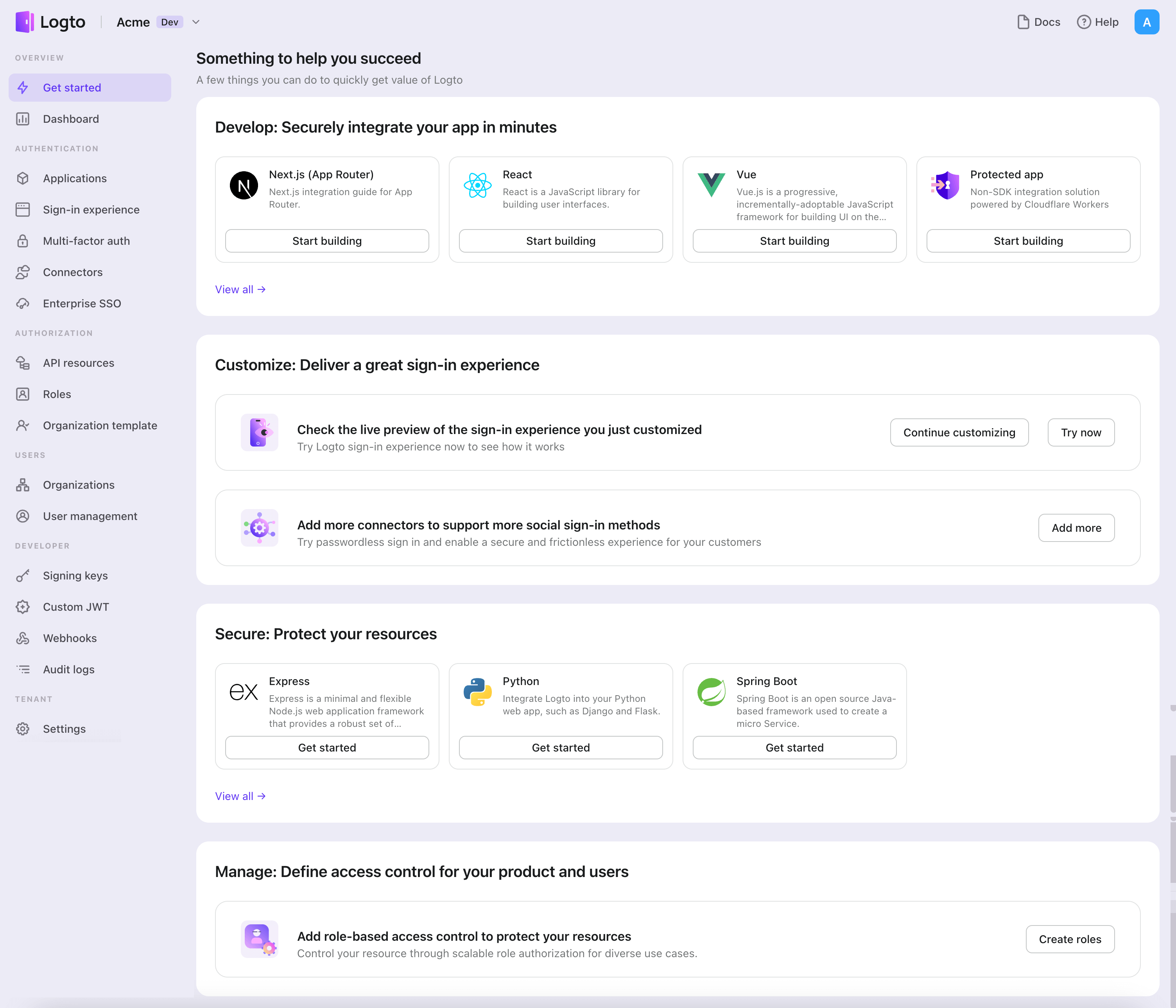
- เปิด Logto Console ในส่วน "เริ่มต้นใช้งาน" ให้คลิกที่ลิงก์ "ดูทั้งหมด" เพื่อเปิดรายการเฟรมเวิร์กของแอปพลิเคชัน หรือคุณสามารถไปที่ Logto Console > Applications แล้วคลิกปุ่ม "สร้างแอปพลิเคชัน"
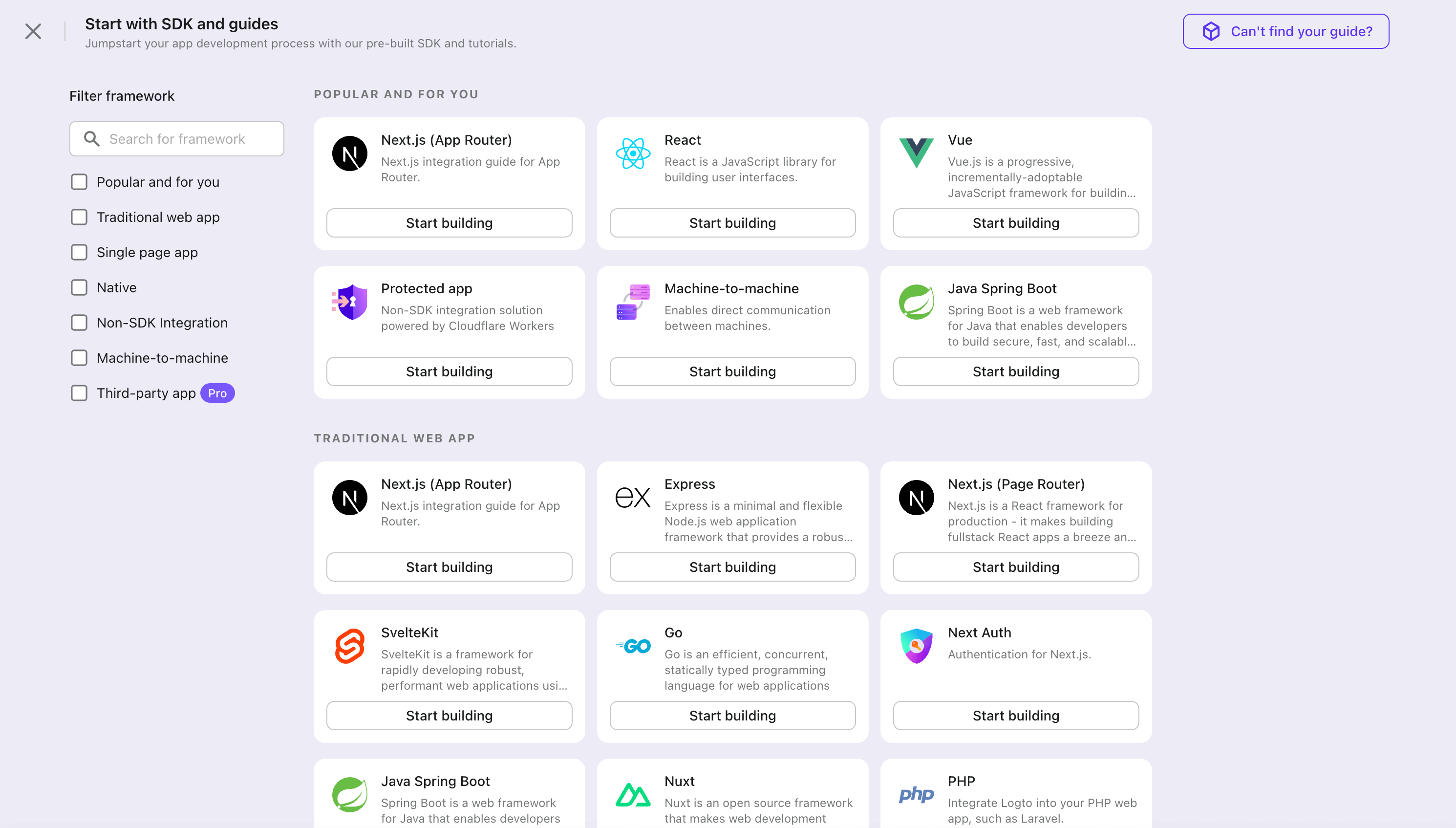
- ในหน้าต่างที่เปิดขึ้น ให้คลิกที่ส่วน "Native app" หรือกรองเฟรมเวิร์ก "Native app" ทั้งหมดที่มีโดยใช้ช่องกรองด่วนทางซ้ายมือ จากนั้นคลิกที่การ์ดเฟรมเวิร์ก "iOS (Swift)" เพื่อเริ่มสร้างแอปพลิเคชันของคุณ
- กรอกชื่อแอปพลิเคชัน เช่น "Bookstore" แล้วคลิก "สร้างแอปพลิเคชัน"
🎉 เยี่ยมมาก! คุณเพิ่งสร้างแอปพลิเคชันแรกของคุณใน Logto คุณจะเห็นหน้าข้อความแสดงความยินดีซึ่งมีคู่มือการเชื่อมต่ออย่างละเอียด ให้ทำตามคู่มือเพื่อดูประสบการณ์ที่จะเกิดขึ้นในแอปพลิเคชันของคุณ
ผสานรวม iOS (Swift) กับ Logto
เพิ่ม Logto SDK เป็น dependency
The minimum supported iOS version of Logto Swift SDK is iOS 13.
Logto Swift SDK comes in two major versions:
- v1: Opens the sign-in experience in an embedded WebView, which is required by the native social plugin targets, but does not support passkey sign-in (WebView does not support WebAuthn, the underlying standard of passkeys).
- v2 (beta): Opens the sign-in experience in
ASWebAuthenticationSession(the system browser), which unlocks passkey sign-in and shares the browser session. Note that v2 removes the native social plugin targets; social connectors still work through the browser. If you depend on the native WeChat or Alipay SDK handoff, stay on v1.
This guide covers both versions. Choose your version in the tabs below, and the choice will be kept in sync throughout this guide.
Use the following URL to add Logto SDK as a dependency in Swift Package Manager.
https://github.com/logto-io/swift.git
Since Xcode 11, you can directly import a Swift package w/o any additional tool.
When Xcode asks for the package version, choose the version you want to integrate:
- v2 (beta)
- v1
v2 is released as 2.0.0-beta.x prereleases until GA. Use 2.0.0-beta.1 or the latest 2.0.0-beta.x prerelease as the version. During beta, we recommend selecting the prerelease explicitly instead of relying on a normal version range to pick it automatically.
If you use Package.swift directly:
.package(url: "https://github.com/logto-io/swift.git", exact: "2.0.0-beta.1")
Use the latest v1 release as the stable line. The latest v1 version is 1.2.0.
If you use Package.swift directly:
.package(url: "https://github.com/logto-io/swift.git", from: "1.2.0")
We do not support Carthage and CocoaPods at the time due to some technical issues.
Carthage
Carthage needs a xcodeproj file to build. We will try to find a workaround later.
CocoaPods
CocoaPods does not support local dependency and monorepo, thus it's hard to create a .podspec for this repo.
เริ่มต้น LogtoClient
เริ่มต้นไคลเอนต์โดยการสร้างอินสแตนซ์ LogtoClient ด้วยอ็อบเจกต์ LogtoConfig
import Logto
import LogtoClient

let config = try? LogtoConfig(
  endpoint: "<your-logto-endpoint>", // เช่น http://localhost:3001
  appId: "<your-app-id>"
)
let client = LogtoClient(useConfig: config)
โดยปกติ เราจะจัดเก็บข้อมูลรับรอง เช่น โทเค็น ID (ID Token) และ โทเค็นรีเฟรช (Refresh Token) ไว้ใน Keychain ดังนั้นผู้ใช้จึงไม่จำเป็นต้องลงชื่อเข้าใช้อีกเมื่อกลับมา
หากต้องการปิดการทำงานนี้ ให้ตั้งค่า usingPersistStorage เป็น false:
let config = try? LogtoConfig(
  // ...
  usingPersistStorage: false
)
ลงชื่อเข้าใช้
ก่อนที่เราจะลงลึกในรายละเอียด นี่คือภาพรวมประสบการณ์ของผู้ใช้ปลายทาง กระบวนการลงชื่อเข้าใช้สามารถสรุปได้ดังนี้:
- แอปของคุณเรียกใช้งานเมธอดลงชื่อเข้าใช้
- ผู้ใช้จะถูกเปลี่ยนเส้นทางไปยังหน้าลงชื่อเข้าใช้ของ Logto สำหรับแอปเนทีฟ ระบบจะเปิดเบราว์เซอร์ของระบบ
- ผู้ใช้ลงชื่อเข้าใช้และถูกเปลี่ยนเส้นทางกลับไปยังแอปของคุณ (ตามที่กำหนดไว้ใน redirect URI)
เกี่ยวกับการลงชื่อเข้าใช้แบบเปลี่ยนเส้นทาง (redirect-based sign-in)
- กระบวนการยืนยันตัวตนนี้เป็นไปตามโปรโตคอล OpenID Connect (OIDC) และ Logto บังคับใช้มาตรการรักษาความปลอดภัยอย่างเข้มงวดเพื่อปกป้องการลงชื่อเข้าใช้ของผู้ใช้
- หากคุณมีหลายแอป คุณสามารถใช้ผู้ให้บริการข้อมูลระบุตัวตน (Logto) เดียวกันได้ เมื่อผู้ใช้ลงชื่อเข้าใช้แอปหนึ่งแล้ว Logto จะดำเนินการลงชื่อเข้าใช้โดยอัตโนมัติเมื่อผู้ใช้เข้าถึงแอปอื่น
หากต้องการเรียนรู้เพิ่มเติมเกี่ยวกับเหตุผลและประโยชน์ของการลงชื่อเข้าใช้แบบเปลี่ยนเส้นทาง โปรดดูที่ อธิบายประสบการณ์การลงชื่อเข้าใช้ของ Logto
Configure redirect URI
- v2 (beta)
- v1
ไปที่หน้ารายละเอียดแอปพลิเคชันของ Logto Console เพิ่ม Redirect URI io.logto.app://callback แล้วคลิก "บันทึกการเปลี่ยนแปลง" (Save changes)

In v2, the sign-in experience opens in ASWebAuthenticationSession (the system browser), and the redirect is routed back to your app through OS-level callback matching. For a custom scheme redirect URI such as io.logto.app://callback, register only the scheme part (io.logto.app) in your app's Info.plist, then add the full redirect URI to your Logto application's Redirect URIs.
In Xcode, open your app target, select Info, expand URL Types, and add one entry with io.logto.app in URL Schemes. If you edit Info.plist directly, add:
<key>CFBundleURLTypes</key>
<array>
  <dict>
    <key>CFBundleTypeRole</key>
    <string>Editor</string>
    <key>CFBundleURLName</key>
    <string>io.logto.app</string>
    <key>CFBundleURLSchemes</key>
    <array>
      <string>io.logto.app</string>
    </array>
  </dict>
</array>
For the browser flow in v2, you do not need to call LogtoClient.handle(url:); that plugin handoff API was removed with the embedded WebView flow.
Use Universal Links instead of a custom scheme?
You can also use an HTTPS redirect URI such as https://example.com/callback:
- Add the Associated Domains capability to your app.
- Configure
webcredentials:example.comsoASWebAuthenticationSessioncan match HTTPS callbacks on iOS 17.4 and newer. - If the same URL should also open your app as a Universal Link outside the authentication session, configure
applinks:example.comand host a validapple-app-site-associationfile for the domain and path. - Add the HTTPS URI to your Logto application's Redirect URIs.
- Pass the same URI to
signInWithBrowser.
On iOS 17.4 and newer, the SDK uses ASWebAuthenticationSession's HTTPS callback matching API so HTTPS redirects can automatically complete and dismiss the session. On older iOS versions, the authorization request can still use the HTTPS redirect URI, but the session may not close automatically unless your app handles the Universal Link callback itself. Keep a custom scheme redirect as a compatibility option if you need automatic completion on older iOS versions.
ไปที่หน้ารายละเอียดแอปพลิเคชันของ Logto Console เพิ่ม Redirect URI io.logto://callback แล้วคลิก "บันทึกการเปลี่ยนแปลง" (Save changes)
The Redirect URI in iOS SDK is only for internal use. There's NO NEED to add a Custom URL Scheme until a connector asks.
Sign-in and sign-out
ก่อนเรียก .signInWithBrowser(redirectUri:) โปรดตรวจสอบให้แน่ใจว่าคุณได้กำหนดค่า Redirect URI ใน Admin Console อย่างถูกต้องแล้ว
- v2 (beta)
- v1
In v2, client.signOut(postLogoutRedirectUri:) performs a complete sign-out: it clears the local credentials, revokes the refresh token, and ends the Logto session by opening the end session endpoint in the system browser. The browser then navigates back to your app through the post sign-out redirect URI. Before using it, switch to the application details page of Logto Console, add the post sign-out redirect URI io.logto.app://signed-out and click "Save changes". The post sign-out redirect URI can use the same custom scheme you registered for sign-in.
For example, in a SwiftUI app:
struct ContentView: View {
  @State var isAuthenticated: Bool

  private let redirectUri = "io.logto.app://callback"
  private let postLogoutRedirectUri = "io.logto.app://signed-out"

  init() {
    isAuthenticated = client.isAuthenticated
  }

  var body: some View {
    VStack {
      if isAuthenticated {
        Button("Sign Out") {
          Task { [self] in
            let error = await client.signOut(postLogoutRedirectUri: postLogoutRedirectUri)
            if let error = error {
              print(error)
              return
            }
            isAuthenticated = false
          }
        }
      } else {
        Button("Sign In") {
          Task { [self] in
            do {
              try await client.signInWithBrowser(redirectUri: redirectUri)
              isAuthenticated = true
            } catch let error as LogtoClientErrors.SignIn {
              // error occurred during sign in
            } catch {
              // other errors
            }
          }
        }
      }
    }
  }
}
- You can also call
client.signOut()without a post sign-out redirect URI. No Console configuration is needed in this case: the browser shows the Logto sign-out page, and the user returns to the app by dismissing it manually. - If no UI context is available, you can call
client.clearCredentials()to clear the local credentials and revoke the refresh token. Note that this keeps the Logto session in the browser, so the nextsignInWithBrowsermay silently sign the user back in through that session.
You can use client.signInWithBrowser(redirectUri:) to sign in the user and client.signOut() to sign out the user.
For example, in a SwiftUI app:
struct ContentView: View {
  @State var isAuthenticated: Bool

  init() {
    isAuthenticated = client.isAuthenticated
  }

  var body: some View {
    VStack {
      if isAuthenticated {
        Button("Sign Out") {
          Task { [self] in
            await client.signOut()
            isAuthenticated = false
          }
        }
      } else {
        Button("Sign In") {
          Task { [self] in
            do {
              try await client.signInWithBrowser(redirectUri: "io.logto://callback")
              isAuthenticated = true
            } catch let error as LogtoClientErrors.SignIn {
              // error occurred during sign in
            } catch {
              // other errors
            }
          }
        }
      }
    }
  }
}
จุดตรวจสอบ: ทดสอบแอปพลิเคชันของคุณ
ตอนนี้คุณสามารถทดสอบแอปพลิเคชันของคุณได้แล้ว:
- รันแอปพลิเคชันของคุณ คุณจะเห็นปุ่มลงชื่อเข้าใช้
- คลิกปุ่มลงชื่อเข้าใช้ SDK จะเริ่มกระบวนการลงชื่อเข้าใช้และเปลี่ยนเส้นทางคุณไปยังหน้าลงชื่อเข้าใช้ของ Logto
- หลังจากที่คุณลงชื่อเข้าใช้แล้ว คุณจะถูกเปลี่ยนเส้นทางกลับไปยังแอปพลิเคชันของคุณและเห็นปุ่มลงชื่อออก
- คลิกปุ่มลงชื่อออกเพื่อเคลียร์ที่เก็บโทเค็นและออกจากระบบ
เพิ่มตัวเชื่อมต่อ SAML
เพื่อเปิดใช้งานการลงชื่อเข้าใช้อย่างรวดเร็วและเพิ่มอัตราการเปลี่ยนผู้ใช้ ให้เชื่อมต่อกับ iOS (Swift) ในฐานะผู้ให้บริการข้อมูลระบุตัวตน (Identity provider) ตัวเชื่อมต่อโซเชียลของ Logto ช่วยให้คุณสร้างการเชื่อมต่อนี้ได้ภายในไม่กี่นาที โดยสามารถกรอกพารามิเตอร์ได้หลายค่า
ในการเพิ่มตัวเชื่อมต่อโซเชียล ให้ทำตามขั้นตอนดังนี้:
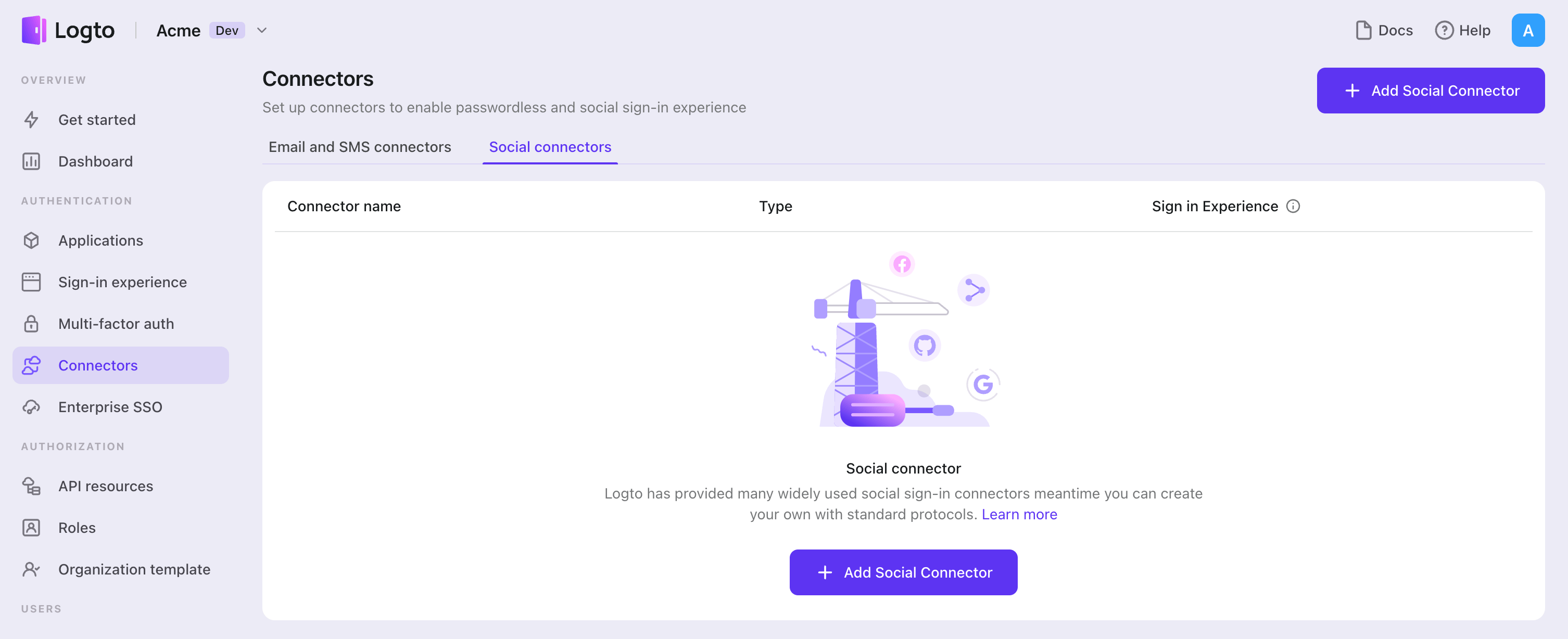
- ไปที่ Console > Connectors > Social Connectors
- คลิก "Add social connector" และเลือก "SAML"
- ทำตามคู่มือ README กรอกข้อมูลที่จำเป็น และปรับแต่งการตั้งค่า
หากคุณกำลังทำตามคู่มือ Connector แบบ in-place คุณสามารถข้ามส่วนถัดไปได้
ตั้งค่า Standard SAML app
สร้างบัญชีผู้ให้บริการข้อมูลระบุตัวตนโซเชียล (IdP) และลงทะเบียนแอปพลิเคชัน SAML (IdP)
มาดูการตั้งค่าของตัวเชื่อมต่อ SAML กัน
ก่อนเริ่มต้น คุณสามารถไปที่ผู้ให้บริการข้อมูลระบุตัวตนโซเชียลที่รองรับโปรโตคอล SAML และสร้างบัญชีของคุณเอง เช่น Okta, OneLogin, Salesforce และแพลตฟอร์มอื่น ๆ ที่รองรับการยืนยันตัวตนตามโปรโตคอล SAML
หาก IdP ของคุณกำหนดให้มีการเข้ารหัส SAML assertion และรับคำขอการยืนยันตัวตนที่ลงนาม คุณควรสร้าง private key และ certificate ที่เกี่ยวข้องโดยใช้ RSA algorithm เก็บ private key ไว้สำหรับใช้กับ SP ของคุณ และอัปโหลด certificate ไปยัง IdP
คุณยังต้องตั้งค่า URL ของ ACS (Assertion Consumer Service) เป็น ${your_logto_origin}/api/authn/saml/${connector_id} เพื่อจัดการ SAML assertion จาก IdP โดยคุณสามารถดู connectorId ได้ที่หน้ารายละเอียดของตัวเชื่อมต่อ SAML ใน Logto Admin Console
ตามการออกแบบของ Logto ในปัจจุบัน เรารองรับเฉพาะ Redirect-binding สำหรับการส่งคำขอการยืนยันตัวตน และ POST-binding สำหรับการรับ SAML assertion แม้จะดูเหมือนไม่ยืดหยุ่นนัก แต่เราเชื่อว่าการออกแบบนี้สามารถรองรับกรณีการใช้งานส่วนใหญ่ของคุณได้ หากคุณพบปัญหาใด ๆ สามารถติดต่อเราได้เสมอ!
ตั้งค่าตัวเชื่อมต่อ SAML (SP)
ในส่วนนี้ เราจะอธิบายแต่ละ attribute อย่างละเอียด
entityID จำเป็นต้องระบุ
entityID (หรือ issuer) คือ ตัวระบุเอนทิตี ใช้เพื่อระบุเอนทิตีของคุณ (SAML SP entity) และจับคู่ความสอดคล้องกันในแต่ละ SAML request / response
signInEndpoint จำเป็นต้องระบุ
Endpoint ของ IdP ที่คุณจะส่งคำขอการยืนยันตัวตน SAML ไป โดยปกติคุณจะพบค่านี้ในหน้ารายละเอียดของ IdP (เช่น SSO URL หรือ Login URL ของ IdP)
x509Certificate จำเป็นต้องระบุ
x509 certificate ที่สร้างจาก private key ของ IdP โดย IdP ควรมีค่านี้ให้
เนื้อหาของ certificate จะขึ้นต้นด้วย -----BEGIN CERTIFICATE----- และลงท้ายด้วย -----END CERTIFICATE-----
idpMetadataXml จำเป็นต้องระบุ
ฟิลด์นี้ใช้สำหรับวางเนื้อหาจากไฟล์ metadata XML ของ IdP ของคุณ
XML parser ที่เราใช้ไม่รองรับ namespace ที่กำหนดเอง หาก metadata ของ IdP มี namespace คุณควรลบ namespace ออกด้วยตนเอง สำหรับ namespace ของไฟล์ XML ดู reference
assertionConsumerServiceUrl จำเป็นต้องระบุ
Assertion consumer service (ACS) URL คือ endpoint ของ SP สำหรับรับ SAML Assertion POST requests จาก IdP ตามที่กล่าวไว้ก่อนหน้านี้ โดยปกติจะตั้งค่าที่ IdP แต่บาง IdP จะรับค่านี้จาก SAML authentication requests ดังนั้นเราจึงเพิ่มฟิลด์นี้เป็นฟิลด์ที่จำเป็น ค่า URL ควรมีลักษณะ ${your_logto_origin}/api/authn/saml/${connector_id}
signAuthnRequest
ค่าบูลีนที่ควบคุมว่าคำขอการยืนยันตัวตน SAML ควรถูกลงนามหรือไม่ ค่าเริ่มต้นคือ false
encryptAssertion
encryptAssertion เป็นค่าบูลีนที่ระบุว่า IdP จะเข้ารหัส SAML assertion หรือไม่ ค่าเริ่มต้นคือ false
attribute signAuthnRequest และ encryptAssertion ควรสอดคล้องกับพารามิเตอร์ที่เกี่ยวข้องใน IdP มิฉะนั้นจะเกิดข้อผิดพลาดเพื่อแจ้งว่าการตั้งค่าไม่ตรงกัน
SAML response ทุกชุดต้องถูกลงนาม
requestSignatureAlgorithm
ควรตั้งค่านี้ให้ตรงกับ signature algorithm ของ IdP เพื่อให้ Logto สามารถตรวจสอบลายเซ็นของ SAML assertion ได้ ค่าอาจเป็น http://www.w3.org/2000/09/xmldsig#rsa-sha1, http://www.w3.org/2001/04/xmldsig-more#rsa-sha256 หรือ http://www.w3.org/2001/04/xmldsig-more#rsa-sha512 โดยค่าเริ่มต้นคือ http://www.w3.org/2001/04/xmldsig-more#rsa-sha256
messageSigningOrder
messageSigningOrder ระบุลำดับการลงนามและเข้ารหัสของ IdP ค่าอาจเป็น sign-then-encrypt หรือ encrypt-then-sign โดยค่าเริ่มต้นคือ sign-then-encrypt
privateKey และ privateKeyPass
privateKey เป็นค่าทางเลือก (OPTIONAL) และจำเป็นเมื่อ signAuthnRequest เป็น true
privateKeyPass คือรหัสผ่านที่คุณตั้งไว้ตอนสร้าง privateKey จำเป็นเมื่อจำเป็นต้องใช้
หาก signAuthnRequest เป็น true certificate ที่สร้างจาก privateKey จะต้องใช้กับ IdP เพื่อตรวจสอบลายเซ็น
encPrivateKey และ encPrivateKeyPass
encPrivateKey เป็นค่าทางเลือก (OPTIONAL) และจำเป็นเมื่อ encryptAssertion เป็น true
encPrivateKeyPass คือรหัสผ่านที่คุณตั้งไว้ตอนสร้าง encPrivateKey จำเป็นเมื่อจำเป็นต้องใช้
หาก encryptAssertion เป็น true certificate ที่สร้างจาก encPrivateKey จะต้องใช้กับ IdP สำหรับเข้ารหัส SAML assertion
สำหรับการสร้าง key และ certificate openssl เป็นเครื่องมือที่ยอดเยี่ยม ตัวอย่างคำสั่งที่อาจเป็นประโยชน์:
openssl genrsa -passout pass:${privateKeyPassword} -out ${encryptPrivateKeyFilename}.pem 4096
openssl req -new -x509 -key ${encryptPrivateKeyFilename}.pem -out ${encryptionCertificateFilename}.cer -days 3650
ไฟล์ privateKey และ encPrivateKey ต้องถูกเข้ารหัสแบบ pkcs1 เป็น pem string ซึ่งหมายความว่าไฟล์ private key ต้องขึ้นต้นด้วย -----BEGIN RSA PRIVATE KEY----- และลงท้ายด้วย -----END RSA PRIVATE KEY-----
nameIDFormat
nameIDFormat เป็น attribute ทางเลือก (OPTIONAL) ที่ประกาศรูปแบบ name id ที่จะตอบกลับ ค่าอาจเป็น urn:oasis:names:tc:SAML:1.1:nameid-format:unspecified, urn:oasis:names:tc:SAML:1.1:nameid-format:emailAddress, urn:oasis:names:tc:SAML:1.1:nameid-format:X509SubjectName, urn:oasis:names:tc:SAML:2.0:nameid-format:persistent หรือ urn:oasis:names:tc:SAML:2.0:nameid-format:transient โดยค่าเริ่มต้นคือ urn:oasis:names:tc:SAML:2.0:nameid-format:unspecified
timeout
timeout คือค่าความยืดหยุ่นของเวลาในการตรวจสอบความถูกต้องของเวลา เนื่องจากเวลาใน SP entity และ IdP entity อาจต่างกัน และการเชื่อมต่อเครือข่ายอาจทำให้เกิดความล่าช้า หน่วยเป็นมิลลิวินาที ค่าเริ่มต้นคือ 5000 (5 วินาที)
profileMap
Logto ยังมีฟิลด์ profileMap ให้ผู้ใช้ปรับแต่งการแมปข้อมูลจากโปรไฟล์ของผู้ให้บริการโซเชียลซึ่งมักไม่เป็นมาตรฐาน โดยแต่ละ key ของ profileMap คือชื่อฟิลด์โปรไฟล์ผู้ใช้มาตรฐานของ Logto และค่าที่เกี่ยวข้องควรเป็นชื่อฟิลด์ในโปรไฟล์โซเชียล ในปัจจุบัน Logto สนใจเฉพาะ 'id', 'name', 'avatar', 'email' และ 'phone' จากโปรไฟล์โซเชียล โดย 'id' เป็นฟิลด์ที่จำเป็น และฟิลด์อื่นเป็นทางเลือก
ประเภทการตั้งค่า
| ชื่อ | ประเภท | จำเป็นต้องระบุ | ค่าเริ่มต้น |
|---|---|---|---|
| signInEndpoint | string | true | |
| x509certificate | string | true | |
| idpMetadataXml | string | true | |
| entityID | string | true | |
| assertionConsumerServiceUrl | string | true | |
| messageSigningOrder | encrypt-then-sign | sign-then-encrypt | false | sign-then-encrypt |
| requestSignatureAlgorithm | http://www.w3.org/2000/09/xmldsig#rsa-sha1 | http://www.w3.org/2001/04/xmldsig-more#rsa-sha256 | http://www.w3.org/2001/04/xmldsig-more#rsa-sha512 | false | http://www.w3.org/2001/04/xmldsig-more#rsa-sha256 |
| signAuthnRequest | boolean | false | false |
| encryptAssertion | boolean | false | false |
| privateKey | string | false | |
| privateKeyPass | string | false | |
| nameIDFormat | urn:oasis:names:tc:SAML:1.1:nameid-format:unspecified | urn:oasis:names:tc:SAML:1.1:nameid-format:emailAddress | urn:oasis:names:tc:SAML:1.1:nameid-format:X509SubjectName | urn:oasis:names:tc:SAML:2.0:nameid-format:persistent | urn:oasis:names:tc:SAML:2.0:nameid-format:transient | false | urn:oasis:names:tc:SAML:1.1:nameid-format:unspecified |
| timeout | number | false | 5000 |
| profileMap | ProfileMap | false |
| ฟิลด์ ProfileMap | ประเภท | จำเป็นต้องระบุ | ค่าเริ่มต้น |
|---|---|---|---|
| id | string | false | id |
| name | string | false | name |
| avatar | string | false | avatar |
| string | false | ||
| phone | string | false | phone |
อ้างอิง
- Profiles for the OASIS Security Assertion Markup Language (SAML) V2.0
- samlify - Highly configuarable Node.js SAML 2.0 library for Single Sign On
บันทึกการตั้งค่าของคุณ
โปรดตรวจสอบให้แน่ใจว่าคุณได้กรอกค่าที่จำเป็นในพื้นที่การตั้งค่าตัวเชื่อมต่อ Logto เรียบร้อยแล้ว คลิก "บันทึกและเสร็จสิ้น" (หรือ "บันทึกการเปลี่ยนแปลง") และตัวเชื่อมต่อ SAML ควรพร้อมใช้งานแล้ว
เปิดใช้งานตัวเชื่อมต่อ SAML ในประสบการณ์การลงชื่อเข้าใช้
เมื่อคุณสร้างตัวเชื่อมต่อโซเชียลสำเร็จแล้ว คุณสามารถเปิดใช้งานเป็นปุ่ม "ดำเนินการต่อด้วย SAML" ในประสบการณ์การลงชื่อเข้าใช้ (Sign-in Experience) ได้
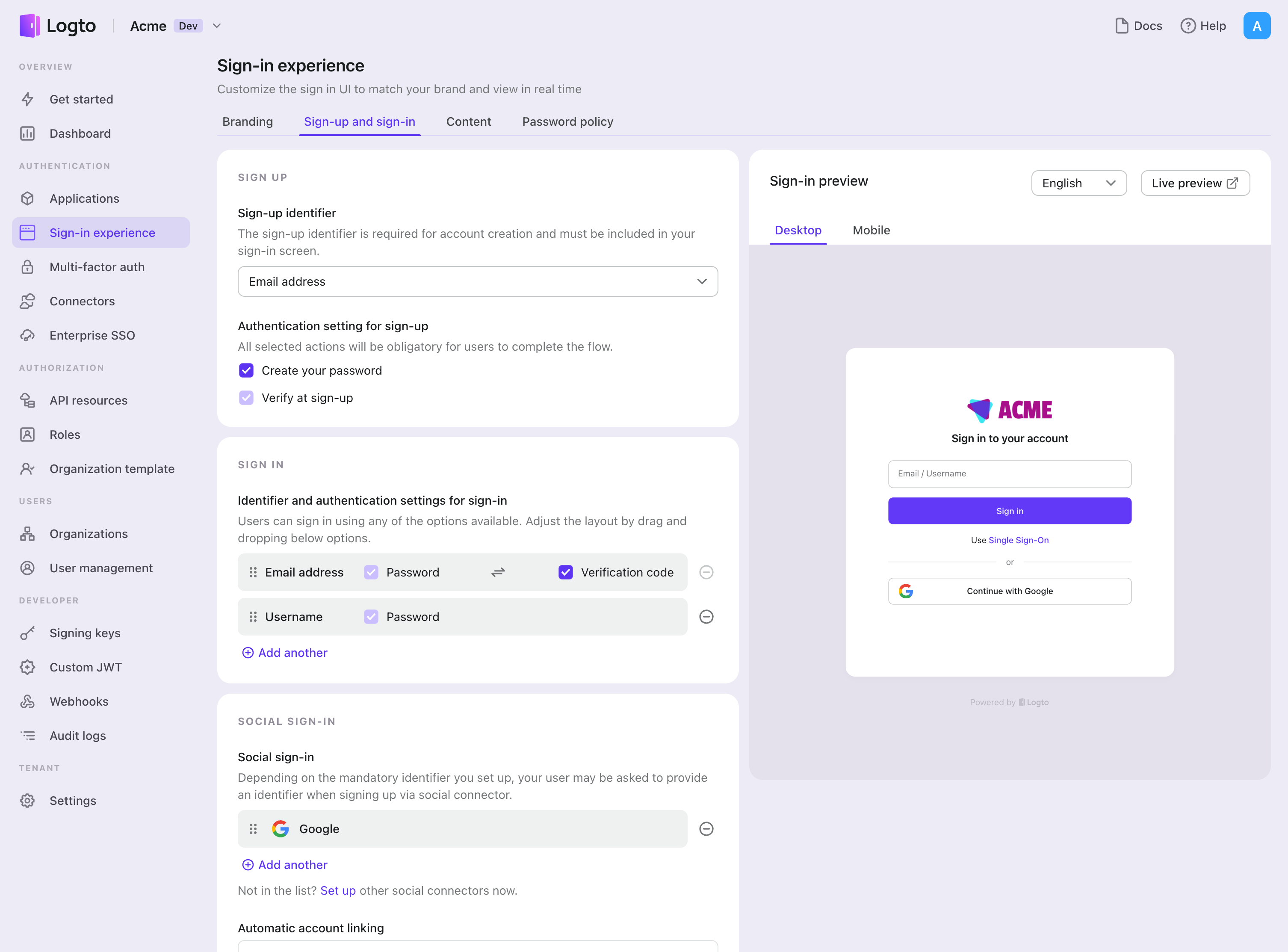
- ไปที่ Console > ประสบการณ์การลงชื่อเข้าใช้ > สมัครและลงชื่อเข้าใช้
- (ไม่บังคับ) เลือก "ไม่เกี่ยวข้อง" สำหรับตัวระบุการสมัคร หากคุณต้องการเฉพาะการเข้าสู่ระบบโซเชียล
- เพิ่มตัวเชื่อมต่อ SAML ที่ตั้งค่าไว้แล้วในส่วน "เข้าสู่ระบบโซเชียล" (Social sign-in)
การทดสอบและการตรวจสอบความถูกต้อง
กลับไปที่แอป iOS (Swift) ของคุณ ตอนนี้คุณควรจะสามารถลงชื่อเข้าใช้ด้วย SAML ได้แล้ว ขอให้สนุก!
อ่านเพิ่มเติม
กระบวนการสำหรับผู้ใช้ปลายทาง: Logto มีโฟลว์การยืนยันตัวตนสำเร็จรูปพร้อมใช้งาน รวมถึง MFA และ Enterprise SSO พร้อม API อันทรงพลังสำหรับการปรับแต่งการตั้งค่าบัญชี การตรวจสอบความปลอดภัย และประสบการณ์แบบหลายผู้เช่า (multi-tenant) ได้อย่างยืดหยุ่น
การอนุญาต (Authorization): การอนุญาต (Authorization) กำหนดว่าผู้ใช้สามารถทำอะไรหรือเข้าถึงทรัพยากรใดได้บ้างหลังจากได้รับการยืนยันตัวตนแล้ว สำรวจวิธีปกป้อง API ของคุณสำหรับแอปเนทีฟและแอปหน้าเดียว (SPA) และการใช้งานการควบคุมการเข้าถึงตามบทบาท (RBAC)
องค์กร (Organizations): ฟีเจอร์องค์กรมีประสิทธิภาพอย่างยิ่งใน SaaS แบบหลายผู้เช่าและแอป B2B โดยช่วยให้สร้างผู้เช่า จัดการสมาชิก RBAC ระดับองค์กร และ Just-in-Time Provisioning ได้
ชุดบทความ Customer IAM: บทความต่อเนื่องเกี่ยวกับการจัดการข้อมูลระบุตัวตนและการเข้าถึงของลูกค้า (Customer IAM) ตั้งแต่ระดับพื้นฐาน 101 ไปจนถึงหัวข้อขั้นสูงและอื่น ๆ